Spades Ace
- 4.8
- Rating
- 10.00K
- Installs
- Free
- Price

 Analysis by App-foxy
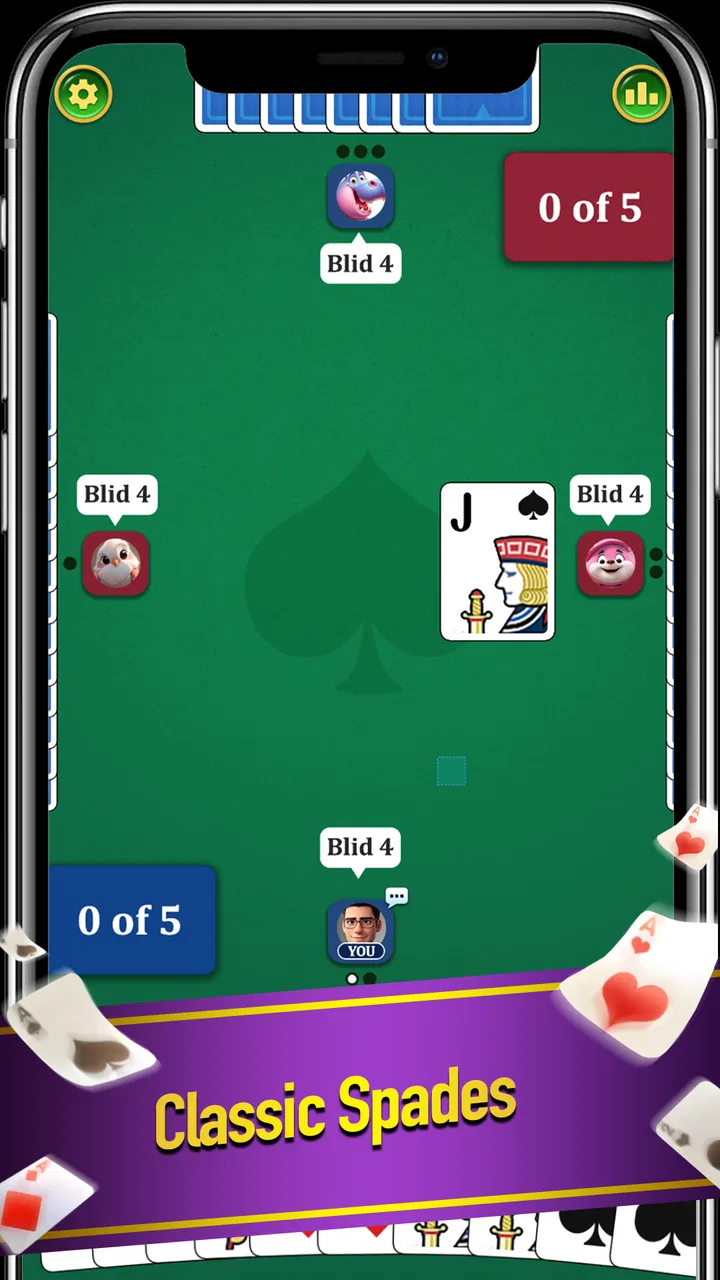
I enjoy card games most when the rules are familiar enough to start quickly but still leave room for careful decisions. Spades Ace takes that approach as a free card game from SATORISYS PLAY, built around a classic four-player team trick-taking format. That sounds simple, but Spades becomes surprisingly demanding once you begin thinking about bids, partner signals, trump timing, and the danger of winning a trick you needed to lose.
My first impression is that this is aimed at people who already know the basic rhythm of Spades or who want a straightforward way to practice it. The store summary is brief, yet the game’s identity is clear: it is not trying to replace every kind of card entertainment. It focuses on one recognizable ruleset and the decisions that happen inside each hand. That narrow focus is a strength for players who want Spades rather than a large collection of unrelated games.
The game is listed in the card category, carries a Teen content rating, and is free to install. SATORISYS PLAY has released it as version 0.0.7, so I approach it as a relatively early build rather than a finished, feature-heavy card platform. It has an average rating of 4.8 from around 862 ratings, with 45 written reviews, and has passed 10K+ installs. Those figures suggest that it has attracted a modest but interested audience, although they should not be confused with the depth or maturity of a much larger card app.
You May Also Like

 AccuWeather: Weather Radar
AccuWeather Review: A Quick, Clear Forecast for Everyday Decisions
For everyday plans, the best forecast is the one you can understand quickly. AccuWeather makes rain timing, radar, and local conditions easy to act on, with a few trade-offs.

 Hill Climb Racing
Why Hill Climb Racing Still Turns Crashes Into One More Run
A tiny car, a bumpy hill and one more upgrade: Hill Climb Racing keeps resurfacing because its simple chaos makes every near-miss feel personal.

 AliExpress - Shopping App
AliExpress Makes Global Shopping Feel Personal, but Shoppers Bear the Risk
AliExpress turns a global marketplace into a pocket-sized discovery engine. Its reach is useful, its shopping loop compelling, and its trade-offs easy to miss.

 Lords Mobile: Kingdom Wars
Lords Mobile Is a Kingdom-Building Routine, Not a Quick Match
A case-by-case verdict on the building, battles, device demands, and social commitments that make Lords Mobile rewarding for some players and exhausting for others.

 PDF Scanner app - TapScanner
TapScanner Makes Paperwork Easier to Capture, Check, and Share
TapScanner makes scanning with a phone feel less like a rescue operation and more like a dependable step in getting work done. Its capture tools are useful, though not flawless.

 Block Blast!
 Shows How Much a Puzzle Game Can Leave Out
A quiet grid game shows why puzzle players increasingly value instant clarity, repeatable skill and low-pressure play—and where the genre still needs to catch up.
More From Our News Desk
View All News


Getting into a hand without unnecessary confusion
The biggest source of friction with a compact card game is often not the rules themselves but the first few minutes around them. Before judging a hand, I would make sure the game has installed correctly, opens without interruption, and reaches its playable screen rather than assuming that every problem is caused by the game. A fresh launch after installation is a sensible first check, especially on an older device.
Spades Ace requires a minimum operating system of Android 9. That is useful to know before spending time troubleshooting an installation that the phone simply cannot support. If the device meets that requirement, I would still check available storage, a stable connection if the game needs one during startup, and whether the operating system is waiting for a restart. These are ordinary checks, but they eliminate many false alarms.
Once the game opens, I would take a moment to identify the current hand’s basic information before tapping quickly. In Spades, the important details are not decorative: your cards, your bid, the running tricks, and the cards already played all affect the next decision. A player who rushes through the opening screen can easily blame the game for a confusing result that actually came from missing a bid or overlooking the suit led.
For a new player, the most useful preparation is learning the vocabulary of the round. A trick is the set of cards played by the four players. The bid is the number of tricks a player expects to take, and the team’s combined bids shape the target for the hand. Spades are the trump suit, which means they can normally beat cards from another suit once spades are allowed into play. Knowing these ideas makes the interface much easier to read.
I would also avoid treating the first few hands as a test of luck. A weak-looking hand can still be valuable if it helps the team avoid taking unwanted tricks, while a hand full of high cards can create trouble if the bid is too ambitious. The practical habit is to count likely winners, notice how many spades you hold, and consider whether your side has enough control to meet the combined bid.
One useful adjustment is to slow down at the start of every trick, even if the legal move seems obvious. Ask which suit was led, whether you can follow it, and whether playing a high card now will remove a future option. This is especially important for people moving from casual card games where the objective is simply to play the strongest card. In Spades, the strongest card is often the wrong card at the wrong moment.
The Teen rating is another small but practical detail for households. I would not present this as a children’s game by default, even though the activity is a traditional card game. Parents choosing something for a younger player should check whether that rating fits their family’s expectations, while adult players can treat it as a reminder that the store classification is not the same as a child-focused label.
What to check when a match does not behave as expected
If a screen appears stuck, my first step would be to wait briefly rather than tapping repeatedly. Repeated taps can make it difficult to tell whether the game is processing an action or whether the input was missed. I would then close and reopen the game, checking whether the same point causes the problem again. If the issue only happens once, it may be a temporary launch or device-state problem rather than a repeatable game defect.
For installation trouble, I would confirm the Android version, free space, and the status of the device’s app store before trying more complicated steps. If the game opens but behaves strangely after an update or interrupted installation, restarting the phone is a reasonable next move. I would avoid clearing saved information as a first reaction, because that can remove local progress or settings without proving what caused the issue.
There is also a simple display check that matters in card games: make sure the phone is not using an unusual text or display scale that hides part of the table. A card game depends on seeing suits, values, and turn information clearly. If the layout looks cropped, changing the device’s display settings temporarily can help identify whether the problem belongs to the app or the phone’s current configuration.
Because the current version is 0.0.7, I would keep expectations realistic around polish. An early version may feel more limited than established Spades apps, and a small interface rough edge does not automatically make the core game unusable. What matters to me is whether the cards remain readable, turns are understandable, and the hand can be completed without losing track of the score.
Recovering your rhythm after a confusing hand
When a round goes badly, I find it more useful to reconstruct the sequence than to start another hand immediately. Look at the cards that have already been played and ask where control changed hands. Did a player fail to follow suit? Was a spade used earlier than expected? Did your team take extra tricks because a high card was played before the opponents’ dangerous cards were removed?
This kind of review turns Spades Ace into more than a quick time-filler. Even without a dedicated training mode, you can create your own practice routine by focusing on one decision at a time. In one hand, concentrate on making a conservative bid. In the next, watch the number of spades that have appeared. Then pay attention to whether your partner’s play supports or undermines the team’s target.
A particularly useful workflow is to separate bidding mistakes from play mistakes. If your team misses its target, the problem may have begun before the first trick. A bid that looked reasonable in isolation can become too high when combined with a partner’s confident estimate. Conversely, a cautious bid can still fail if the team gives away control through poor timing.
I also recommend treating low cards as information rather than dead weight. A low card can help you follow suit without taking a trick, and that may be exactly what the team needs. If you are holding several cards in one suit, that distribution can influence when you will be forced to use a spade. Thinking in terms of future exits—ways to get rid of awkward cards—often produces better results than chasing every available trick.
For players who already know Spades, the practical challenge is resisting automatic play. Familiarity can make you tap on instinct, especially when a high card appears safe. I get better results when I pause to count the tricks my team has taken, estimate the remaining target, and decide whether the current trick helps or harms that plan. That small pause is more valuable than trying to play every hand quickly.
Knowing when the phone, connection, or setup is responsible
Not every interruption should be blamed on the game. If other apps are also slow, the phone may be low on memory or dealing with a broader system problem. If only the initial launch is affected, a restart and a clean reopening are sensible. If the game works normally after those steps, I would not assume that the card logic itself is unreliable.
Connection-related behavior deserves the same caution. If a match or screen takes unusually long to load, test the device with another ordinary online activity before changing several settings at once. Switching between a reliable Wi-Fi connection and mobile data can help identify whether the issue follows the network. I would make one change at a time so the result remains clear.
Battery-saving modes can also interfere with how quickly an app resumes after being left in the background. If a session returns to an unexpected screen, fully closing the game and reopening it is safer than repeatedly pressing buttons. I would also avoid switching rapidly between apps during an important hand, since card games depend on remembering the current trick and turn.
When reporting a repeatable issue, the most helpful description is specific: the device’s Android version, what screen was open, what action was tapped, and whether reopening reproduced the same behavior. “It failed” is much less useful than explaining that the game stopped responding after a particular card action on repeated attempts. That approach helps separate a one-time device hiccup from a genuine software problem.
How it compares with familiar alternatives
Compared with a broad card collection, Spades Ace has a clearer purpose. A multi-game app may offer solitaire, hearts, freecell, and several variations in one package, which is better for someone who wants variety. This game is more appealing when you want to stay with Spades and improve your decisions instead of browsing through unrelated tables.
It also differs from playing with physical cards. A phone is convenient when nobody has a deck nearby, and it makes a short solo session possible. The trade-off is that a digital game cannot reproduce the social atmosphere of sitting around a table, reading opponents’ reactions, or discussing a questionable bid with friends. If the social ritual matters more than convenience, a physical deck or a group-focused option may be the better choice.
Against a mature online card platform, the early version is likely to feel less compelling for players who expect a large community, extensive customization, or many established modes. I would choose Spades Ace for a focused, lightweight experience rather than for a complete social ecosystem. That distinction is important: its appeal comes from the central card game, not from an assumption that it replaces every alternative.
The free price makes trying it easy, but free does not automatically mean frictionless. I would judge it by whether the basic hand flow is comfortable and understandable, not by expecting the same breadth as a long-established premium card product. Someone who wants a simple entry point can benefit from that focus; someone seeking advanced options may quickly notice the narrower scope.
Who will get the most from Spades Ace
I think this game suits players who already enjoy trick-taking cards and want an accessible way to play on an Android device. It can also work for a learner who is willing to study the rules while playing, provided they do not expect every decision to be explained for them. The four-player team structure gives each hand more depth than a purely individual score chase because your choices affect a partner’s target as well as your own.
A realistic everyday use case is a short break when you have a few quiet minutes and want something more engaging than passive scrolling. I might play a hand while waiting for an appointment, then stop after the round rather than committing to a long campaign. The game’s value in that situation is its focused subject: I can return to the same kind of decision-making without learning a new ruleset each time.
It is less suitable for someone who dislikes careful counting, delayed rewards, or the frustration of a partner’s uncertain play. It is also not my first recommendation for a player who wants a visually elaborate card adventure, a large multiplayer community, or a broad library of games. Those needs point toward different categories of apps, even if the person also enjoys Spades.
For new players, I would begin by bidding conservatively and watching how many tricks the team actually takes. Do not try to imitate an aggressive player immediately. For experienced players, I would use the early hands to test discipline: count the remaining spades, preserve low cards when they offer an escape, and avoid taking a trick merely because you can. Those habits make the experience more rewarding than chasing a quick win.
My practical verdict after using it
The best reason to try Spades Ace is its focused, familiar card-game loop. SATORISYS PLAY has presented a free option for people who want the classic team trick-taking experience without searching through a large collection first. The strong average rating and growing install base make it worth a look, while the early version means I would keep expectations measured about polish and breadth.
I would install it if I wanted a direct Spades session, especially on a device running Android 9 or newer and in situations where a physical deck or regular group is not available. I would begin with the basic setup checks, play slowly enough to understand each trick, and treat the first several hands as practice rather than a final judgment. That approach exposes the game’s strategic appeal while reducing frustration caused by rushed decisions.
My recommendation is more qualified for players looking for a complete card hub. In that case, a broader alternative may offer more variety, while a socially oriented option may better support regular play with friends. Spades Ace makes the most sense when the specific attraction is Spades itself and you prefer a compact, free way to return to the game.
Overall, I see it as a promising focused choice rather than an all-purpose card destination. Its simple premise leaves room for the quality of the actual hand flow to matter, and that is where I would make the final decision: are the cards readable, are turns clear, and does the game let you think about the next trick instead of fighting the interface? If the answer is yes on your device, this is an easy game to keep available for a quick, thoughtful round.
FAQs for Spades Ace
01What is Spades Ace and how does the game work?
Spades Ace is a digital version of the classic Spades trick-taking card game, designed for mobile devices. Players bid on the number of tricks they expect to win, then play cards while following the suit led whenever possible. Spades are always trump, and the objective is to meet your bid while helping your team score more points than its opponents.
02Can I play Spades Ace offline or without creating an account?
Availability of offline play and account requirements may depend on the version installed and the platform you are using. In general, card games like Spades Ace may offer solo matches against computer-controlled opponents, while online multiplayer features usually require an internet connection. Before downloading, check the app-store description to confirm whether guest play, offline matches, or account registration are supported.
03Does Spades Ace include online multiplayer and competitive features?
Spades Ace may include online matches that let you play against other users, depending on the current release and regional availability. Multiplayer can make the game more engaging because success depends on bidding, communication through play, and adapting to unpredictable opponents. Users should review the latest listing for information about matchmaking, leaderboards, tournaments, private rooms, and any internet or account requirements.
04Is Spades Ace free to download, and does it contain purchases or advertisements?
The game may be available as a free download, but free access does not always mean that every feature is included without limitations. Mobile card games commonly use advertising, optional in-app purchases, virtual currency, or premium upgrades. We recommend checking the Google Play or App Store listing before installing Spades Ace, especially if you want an ad-free experience or prefer to avoid accidental purchases.
05Is Spades Ace suitable for beginners and experienced Spades players?
Spades Ace can be suitable for both newcomers and experienced players if it provides clear rules, adjustable difficulty, and enough practice opportunities. Beginners should learn how bidding, nil bids, bags, trump cards, and scoring work before entering competitive matches. Experienced players may enjoy testing different strategies, although the quality of the challenge depends on the artificial intelligence and multiplayer community included in the version you download.
Pros
- Smooth controls make bidding and card play easy to learn.
- Offers quick matches for players who prefer shorter game sessions.
- Clear card visuals remain readable on smaller phone screens.
- Helpful scoring keeps track of tricks and bids automatically.
- Good choice for practicing Spades without needing a physical deck.
Cons
- Online matchmaking may depend heavily on the number of active players.
- Computer opponents can feel predictable after extended play.
- Some features may require an internet connection to work properly.
- Ads can interrupt the experience for users on the free version.
- Limited customization may disappoint players seeking more table options.

Spades Ace
Gallery